HubSpot is powerful, but if you have a decent-sized audience you want to track, it’s extremely expensive for what it provides.
If you’re looking for a great alternative to HubSpot that’s low cost—particularly for businesses with large contact databases—consider exploring Mautic.

What is Mautic?
Mautic is an open-source marketing automation platform that gives you complete control over your marketing data and campaigns. Unlike HubSpot’s tiered pricing that can quickly escalate into thousands of dollars per month, Mautic is free to download and self-host, with costs limited to your hosting infrastructure.
The platform was built by marketers who understood the need for enterprise-level marketing automation without enterprise-level pricing. It’s now maintained by Acquia and has a thriving community of contributors and users.
Mautic Live Demo
Before diving into the feature comparison, you can explore Mautic hands-on with this live demo:
Demo URL: https://m5demo.mauteam.org
Username: Mautic51DEMO!
Password: Mautic51DEMO!
Click around, explore the interface, build a test campaign, or create a segment. This demo environment gives you full access to see how Mautic works in practice before committing to a migration.
Feature Comparison: Mautic vs HubSpot
Contact Management
HubSpot’s Marketing Hub Professional starts at $800/month for up to 2,000 contacts, with pricing increasing dramatically as your contact database grows.
Mautic lets you track unlimited contacts with no additional fees. Store detailed contact information, custom fields, and segment your audience based on any criteria you define. Your only limitation is your server capacity.

Email Marketing
HubSpot includes drag-and-drop email builder, A/B testing, and automation workflows in higher-tier plans.
Mautic provides a full-featured email builder with template customization, A/B testing, and dynamic content. You can send unlimited emails without worrying about contact-based pricing tiers. Integration with your preferred SMTP provider gives you complete control over deliverability.

Marketing Automation
HubSpot’s workflows and automation are available starting at Professional tier ($800/month).
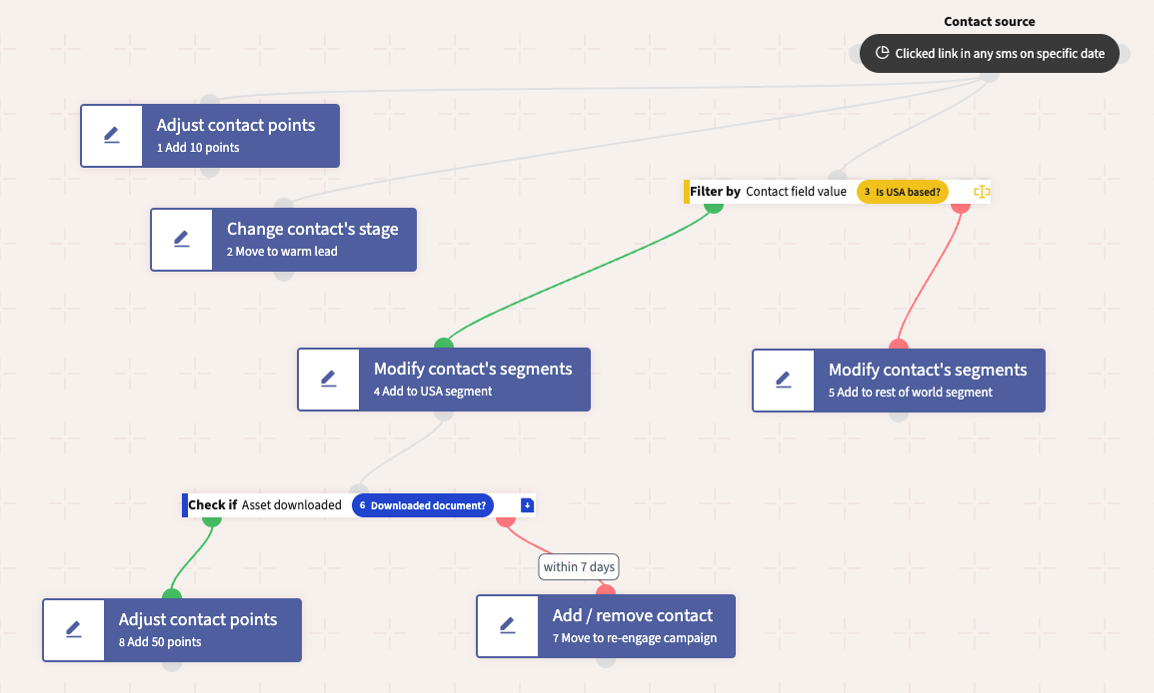
Mautic’s Campaign Builder lets you create sophisticated automation workflows with a visual drag-and-drop interface. Build multi-touch nurture campaigns, trigger actions based on contact behavior, and create decision trees as complex as you need.
Landing Pages & Forms
HubSpot’s landing page builder is included in all paid tiers but limited by contact pricing.
Mautic lets you create unlimited landing pages and forms with full customization. Embed forms anywhere, track submissions automatically, and use progressive profiling to gather more contact data over time without overwhelming your visitors.

Lead Scoring
HubSpot’s lead scoring is available in Professional tier and above.
Mautic includes built-in lead scoring with complete flexibility to define your own criteria. Assign points based on email opens, page visits, form submissions, or any tracked behavior. Create multiple scoring models for different segments or buyer personas.
Analytics & Reporting
HubSpot offers comprehensive reporting dashboards in all tiers, with advanced analytics in higher plans.
Mautic lets you track campaign performance, email metrics, contact lifecycle stages, and custom reports. See real-time data on contact activity, campaign effectiveness, and ROI. Export data for deeper analysis or integrate with your preferred business intelligence tools.
Social Media Integration
HubSpot includes social media scheduling and monitoring in Marketing Hub Professional.
Mautic monitors social channels and triggers campaigns based on social activity. While not as robust as HubSpot’s social features, it covers core functionality for campaigns triggered by social engagement.
Website Tracking
HubSpot uses JavaScript tracking code to monitor visitor behavior across your website.
Mautic lets you drop a tracking pixel on your site to monitor anonymous and known visitors. Track page views, time on site, and conversion paths. Connect website behavior directly to campaign triggers and lead scoring.
Segmentation
HubSpot lets you create lists and segments based on contact properties and behaviors.
Mautic’s powerful segment builder lets you create dynamic lists based on any contact field, activity, campaign membership, or custom criteria. Segments update in real-time as contacts meet or leave criteria.
Multi-Channel Campaigns
HubSpot combines email, social, ads, and content in unified campaigns.
Mautic orchestrates campaigns across email, SMS, web notifications, and social channels. Create cohesive multi-touch experiences that move contacts through your funnel.
Mautic Limitations
While Mautic handles core marketing automation effectively, there are scenarios where HubSpot’s integrated ecosystem provides clear advantages.
No Built-in CRM
HubSpot includes a full CRM with sales pipeline management, deal tracking, and revenue attribution. Mautic focuses solely on marketing automation. You’ll need to integrate with a separate CRM like SuiteCRM, Salesforce, or Pipedrive.
Limited Content Management
HubSpot’s CMS Hub lets you build and manage entire websites with built-in SEO tools and content optimization. Mautic has basic landing page capabilities but isn’t a replacement for a full content management system.
Requires Technical Resources
Self-hosting Mautic means you’re responsible for server maintenance, updates, security patches, and troubleshooting. If your team lacks technical expertise, you’ll need to hire developers or use a managed hosting provider.
Smaller Plugin Ecosystem
HubSpot’s marketplace offers hundreds of pre-built integrations. Mautic’s plugin ecosystem is growing but significantly smaller. You may need custom development for specific integrations.
Less Polished Interface
HubSpot invests heavily in UX design and user experience. Mautic’s interface is functional but less refined. Non-technical marketers may find HubSpot more intuitive.
No Built-in Sales Tools
HubSpot includes email tracking, meeting scheduling, document management, and sales automation. Mautic doesn’t provide these sales-focused features.
Limited Support Options
HubSpot offers phone support, extensive documentation, and training resources. With Mautic, you rely on community forums, documentation, and paid support from third-party providers.
Deal Pipelines & SalesForce Sync
If you need an all-in-one platform where marketing, sales, and service teams work from a single system, HubSpot’s integrated approach may justify the cost.
Where Mautic Beats Hubspot
Beyond just cost savings, Mautic makes several common marketing automation tasks significantly easier than HubSpot.
Custom Event Tracking
With HubSpot, tracking custom events requires either using their specific event tracking API or purchasing higher-tier plans for more flexibility. Mautic’s API makes custom event tracking straightforward—send any data point you want to track and immediately use it in campaigns, segmentation, or lead scoring.
Track product usage events, in-app behaviors, purchase activities, or custom business metrics without wrestling with API limitations or pricing tiers. Every custom field and event you create is immediately available throughout the platform.
Email Templates & Campaigns
One of the big advantages I see with Mautic when compared to Hubspot is the ability to create templated emails that can be programmatically sent, similar to a transactional email.
HubSpot’s transactional email features require either Sales Hub or additional API access, often with limitations on customization and volume. Mautic’s API was built for programmatic email sends.
Send password resets, order confirmations, shipping notifications, or any transactional message directly through Mautic’s API. Use the same templates, personalization, and tracking as your marketing emails. No separate transactional email service needed, no additional per-email costs, and complete control over deliverability by choosing your preferred SMTP provider.
Dynamic Content
Creating personalized, dynamic email content in HubSpot requires understanding their smart content rules and often hits limitations. Mautic’s template engine gives developers direct access to contact fields, custom fields, and conditional logic using simple Twig syntax.
Build emails that adapt based on contact data, behavior, or any custom criteria without fighting against platform restrictions. Your development team can implement sophisticated personalization that would be impossible or prohibitively expensive in HubSpot’s higher tiers.
API Integration
Mautic was built with an API-first approach. Every feature accessible in the interface is also available through the REST API. Build custom dashboards, integrate with internal tools, automate contact management, or trigger campaigns from external systems without workarounds.
This makes Mautic ideal for businesses with technical teams who want to build custom marketing technology stacks rather than being constrained by a platform’s limitations.
Making the Switch
Migrating from HubSpot to Mautic requires some technical setup, but the long-term savings and flexibility make it worthwhile for many organizations. You’ll need to:
- Set up hosting infrastructure (or use a managed Mautic provider)
- Export your contact data from HubSpot
- Rebuild your email templates and landing pages
- Recreate automation workflows in Mautic’s campaign builder
- Update your website tracking code
The investment in migration pays off quickly when you’re no longer constrained by per-contact pricing or feature tier limitations.

Server Requirements
Running Mautic requires a web server with specific technical specifications. At minimum, you’ll need PHP 8.0 or higher, MySQL 5.7.14+ or MariaDB 10.3+, and a web server like Apache or Nginx. Your server should have at least 256MB of PHP memory allocated, though 512MB or more is recommended for larger installations.
Storage requirements scale with your contact database and email activity. A small installation might need just a few gigabytes, while enterprise deployments with millions of contacts and extensive email history could require significantly more.
For teams that want managed hosting without the complexity of server administration, Kinsta’s Application Hosting provides an excellent middle ground. Their platform handles server maintenance, automatic backups, and scaling while giving you the cost benefits of self-hosting Mautic.
| Plan | Resources | Estimated Use | Price |
|---|---|---|---|
| S1 | 1 vCPU, 2GB RAM, 10GB storage | Small instances, testing | $25/month |
| S2 | 2 vCPU, 4GB RAM, 20GB storage | Growing contact lists | $35/month |
| S3 | 4 vCPU, 8GB RAM, 40GB storage | Medium deployments | $70/month |
| S4 | 8 vCPU, 16GB RAM, 80GB storage | Large active campaigns | $140/month |
| S5 | 16 vCPU, 32GB RAM, 160GB storage | Enterprise deployments | $280/month |
For detailed technical specifications, installation guides, and optimization recommendations, review the complete requirements
Configuring SMTP for Email Delivery
Unlike HubSpot’s built-in email infrastructure, Mautic gives you complete control over email delivery by letting you choose your own SMTP provider. This flexibility means you can optimize for deliverability, cost, or specific technical requirements.
| Provider | Pricing |
|---|---|
| Amazon SES | $0.10 per 1,000 emails |
| SendGrid | Free up to 100 emails/day, paid plans from $19.95/month |
| Mailgun | $35/month for 50,000 emails |
| Postmark | $15/month for 10,000 emails |
| SparkPost | $20/month for 50,000 emails |
Configure your SMTP settings in Mautic’s email configuration panel by entering your provider’s server address, port, authentication credentials, and encryption method. Most providers use port 587 with TLS encryption. Once configured, Mautic routes all marketing and transactional emails through your chosen provider, giving you detailed delivery metrics and the ability to monitor sender reputation independently.
This separation between your marketing automation platform and email infrastructure means you can switch providers without migrating your entire marketing stack, optimize costs as you scale, and maintain better control over deliverability compared to HubSpot’s shared sending infrastructure.
Conclusion
If you’re spending over $1,000/month on HubSpot and have basic to intermediate marketing automation needs, Mautic deserves serious consideration. The open-source model gives you complete data ownership, unlimited scalability, and freedom from recurring subscription costs that scale with your success.
For businesses with technical teams or specific needs around event tracking, programmatic emails, or custom integrations, Mautic often provides superior flexibility compared to HubSpot’s more rigid structure.
While HubSpot offers a more polished interface and deeper all-in-one capabilities, Mautic provides the core marketing automation features most businesses actually use—without the enterprise price tag.