This has been released as the Visual Editor Biography Plugin in the WordPress Plugin repository.
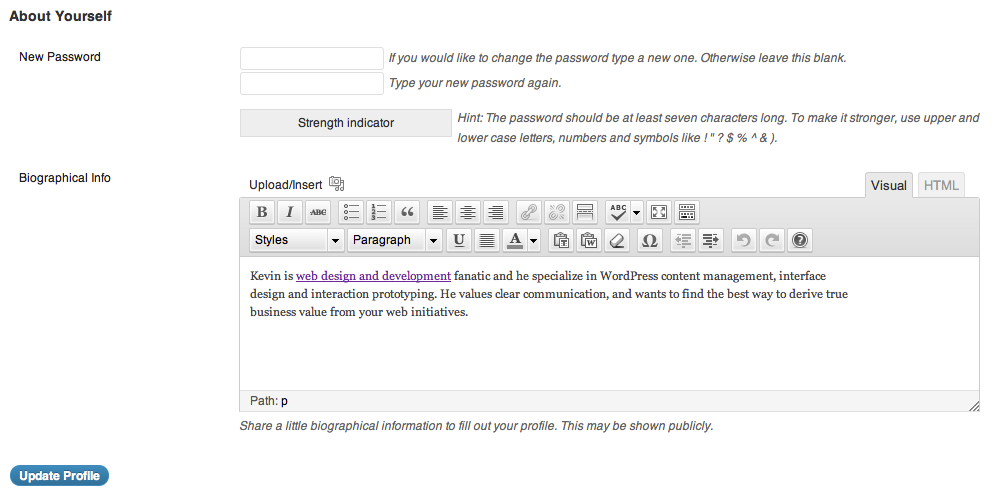 WordPress has a basic profile setup that allows you to store settings about authors. In your journey as a WordPress theme developer you may find that it’s quite handy to have a rich text biography field included in your user profiles.
I frequently come across situations where an author’s biography needs to be visible in a theme (think author templates and sidebar widgets). Here’s a solution I use quite often, hopefully it makes your next WordPress web project easier!
The Functions
This bit of code will automatically turn the Biographical Info textarea field into a TinyMCE editor using the new wp_editor() function added to WordPress 3.3.
Add this to your functions.php file:
/**
 *  Add TinyMCE editor to the "Biographical Info" field in a user profile
 */
function kpl_user_bio_visual_editor( $user ) {
    // Requires WP 3.3+ and author level capabilities
    if ( function_exists('wp_editor') && current_user_can('publish_posts') ):
    ?>
    <script type="text/javascript">
    (function($){
        // Remove the textarea before displaying visual editor
        $('#description').parents('tr').remove();
    })(jQuery);
    </script>

    <table class="form-table">
        <tr>
            <th><label for="description"><?php _e('Biographical Info'); ?></label></th>
            <td>
                <?php
                $description = get_user_meta( $user->ID, 'description', true);
                wp_editor( $description, 'description' );
                ?>
                <p class="description"><?php _e('Share a little biographical information to fill out your profile. This may be shown publicly.'); ?></p>
            </td>
        </tr>
    </table>
    <?php
    endif;
}
add_action('show_user_profile', 'kpl_user_bio_visual_editor');
add_action('edit_user_profile', 'kpl_user_bio_visual_editor');

/**
 * Remove textarea filters from description field
 */
function kpl_user_bio_visual_editor_unfiltered() {
    remove_all_filters('pre_user_description');
}
add_action('admin_init','kpl_user_bio_visual_editor_unfiltered');
That’s it!
Display a Rich Text User Bio in Your WordPress Theme

I commonly use this bit of code in the author.php theme file to display a nice rich text author bio and image above the list of posts.
PHP/HTML for author.php
First let’s check to see if a user has entered a bio. If they have then we’ll display an About The Author box above the list of posts.
<?php
$description = get_the_author_meta( 'description', $post->post_author );
if ( $description ):
?>
<div class="author-bio clearfix">
    <h2 class="caps-title">About The Author</h2>
    <?php if ( function_exists('get_avatar') ) echo get_avatar($author_id, '100'); ?>
    <div class="entry">
        <?php echo apply_filters('the_content', $description); ?>
    </div>
</div>
<?php endif; ?>
Making It Pretty With CSS
Here’s a basic bit of CSS to get you started with styling your About The Author box.
.author-bio {
    background:#fff;
    border:1px solid #ccc;
    -webkit-border-radius:10px;
    -moz-border-radius:10px;
    border-radius:10px;
    padding:14px 18px;
    margin:0 0 20px;
}
.author-bio .caps-title {
    font-size:18px;
    line-height:1.3em;
    text-transform:uppercase;
    letter-spacing:1px;
    margin:0 0 5px;
}
.author-bio img {
    float:left;
    width:100px;
    height:100px;
    margin:4px 10px 4px 0;
}
.author-bio .entry {
    margin:0 0 0 118px;
    color:#666;
}
That’s it! You should now have a nice TinyMCE editor on your WordPress profile editor along with an understanding of how to add a nice About The Author box to your theme.
Let me know if you have any trouble implementing this, I’m happy to help out where I can.