6 Ways To Create Custom Write Panels in WordPress
- Share /
- CMS, Plugins, Wordpress / 8.13.09 / 23 Comments / /
When you start to use WordPress as a CMS you begin to realize that one WYSIWYG area isn’t going to cut it. At that point you may start to explore the option of custom fields. They’re great, and they work well for handling small changes. But what happens when you need to have multiple WYSIWYG areas, or upload files, or manage content using other form fields like checkboxes, radio toggle’s or text inputs. To do this you’ll need the power of custom write panels. There are many ways to create them; some involve the use of plugins and some don’t. I’m going to discuss a few of the way’s I’ve created custom write panels, and explain the ups and downs of each approach. If anyone has any suggestions please leave your thoughts as comments; they may be added to the post in the future.
1. More Fields
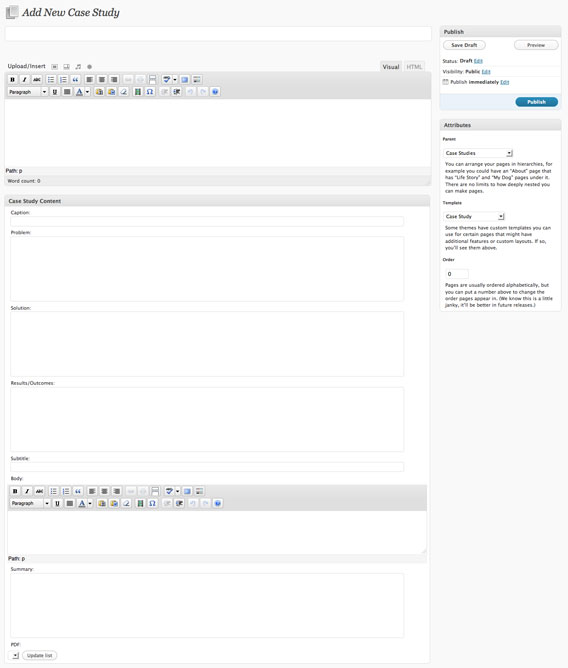
More Fields is the plugin that I’ve chosen to use for most of my custom field scenarios. It allows you to create your own “post type” to make the WordPress administrative interface more intuitive for less tech savvy users. By default WordPress has two “post types”, Pages and Posts. Any custom post type you create is based on either a Post or Page. Let’s say that you wanted to create your own post type called Case Studies. If you select Page as the Case Studies post type, then any Case Studies you create will appear under the Case Studies menu as well as under the Pages menu. At this point you may be asking yourself, what’s the point? If your Case Studies show up under Pages and Case Studies what’s the difference.
The difference is that you can control what options show up on Case Studies side of things. You can remove the Excerpt, Send Trackbacks, Custom Fields, Discussion or Post Slug boxes. If you want to add your own custom write panels for Case Studies, you can create “Boxes” that have specific form fields in them. These fields include:
- Single line text fields
- Multi-line textarea fields
- WYSIWYG editors (without the ability to upload images unfortauntely)
- Checkboxes
- Radio toggles
- Selectable file list that will let you choose from the files uploaded by the main WYSIWYG editor for that specific page or post
These boxes become write panels and are visible only on post types you choose. It all sounds complex, I know, but I would highly recommend setting up a WordPress sandbox install somewhere and playing around with it. It’s truly very powerful.
The Lowdown
If your looking for an easy to setup alternative to Flutter that allows you to create custom post types then More Fields may be for you.
2. Custom Field Template
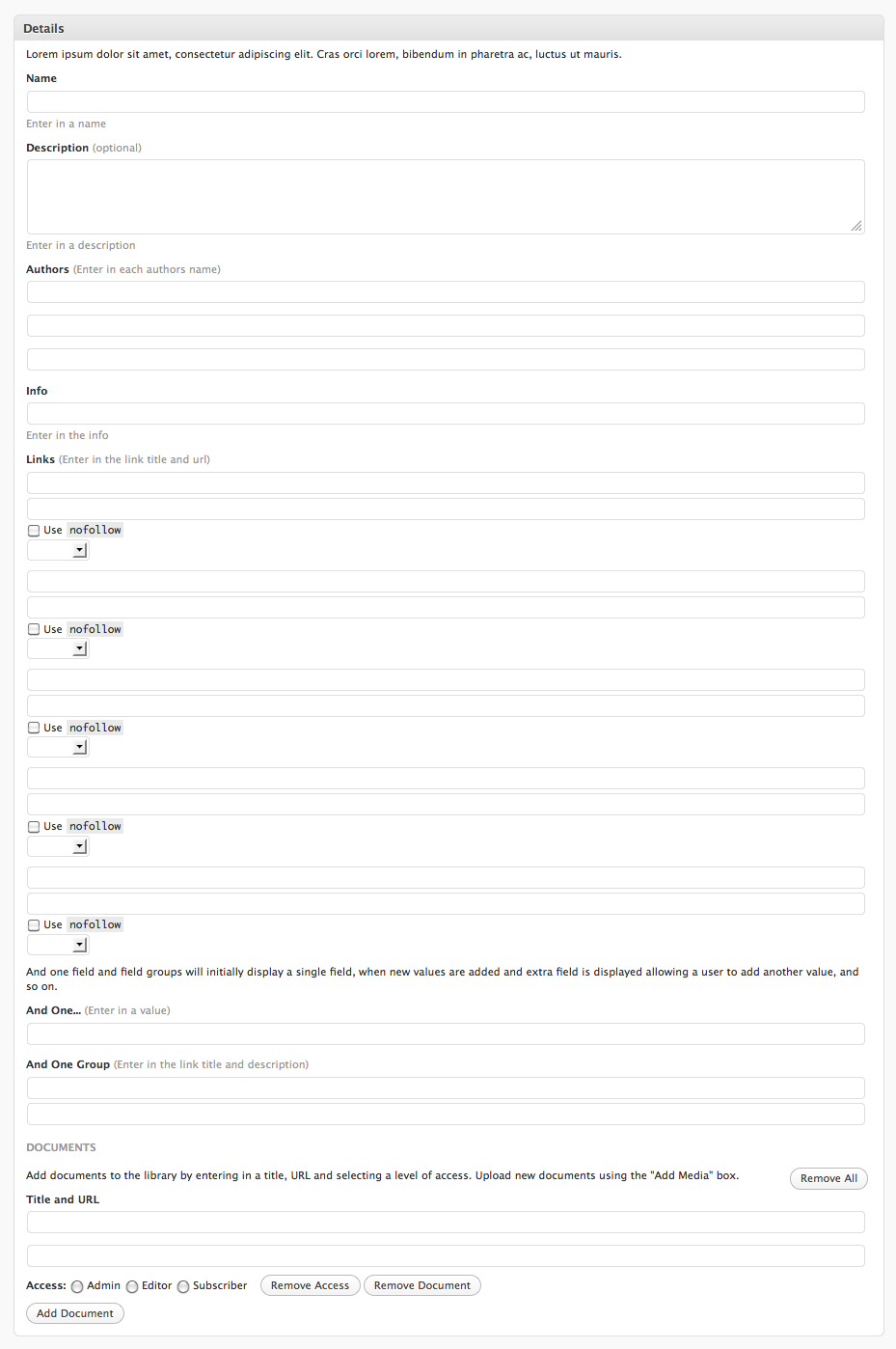
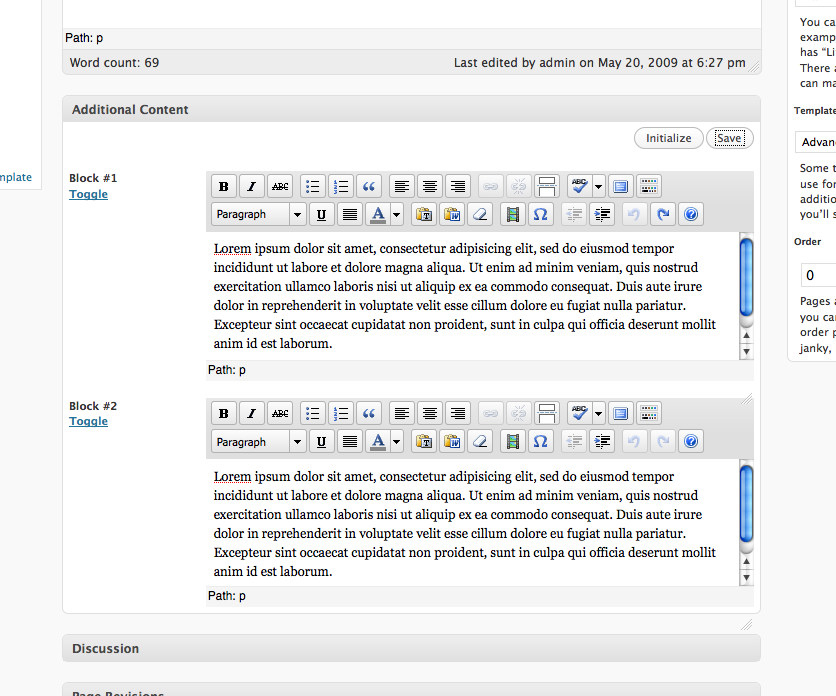
The Custom Field Template plugin is very similar to More Fields, and was the first plugin I explored for managing custom fields and write panels. It has it’s advanatages and disadvantages. Unlike More Fields, the Custom Field Template plugin does not provide the ability to manage “Post Types”. Any custom fields you create will show up for all Posts, or Pages, depending on how the plugin has been setup. You can add a WYSIWYG editor with the ability to upload files; something you can’t currently do with More Fields.
If your interested in how you can setup the Custom Field Template on your site, check out my Advanced Content Management with WordPress Custom Field Templates tutorial post.
The Lowdown
If your looking for a rock solid way to add a custom write panels to your pages and posts, then Custom Field Template may be your guy.
3. Flutter
Flutter is a very popular plugin that add’s a great deal of custom field power to WordPress. Like More Fields, you can create custom post types that have specific custom fields attached to them. It’s a bit difficult to get setup, and it will probably require the skills of an experienced web developer to get up and running.
Once it is up and running it’s absolutely wonderful. Flutter has better file management than any other plugin on this list, allowing you to upload images or files using two separate fields.
The Lowdown
If your looking for a solid write panel and post type creator with great file management fields then Flutter may be for you.
4. Pods CMS
Pods is a CMS framework that lets you create, manage, and display your own content types. Don’t bother hacking blog posts into becoming something they’re not. With Pods, create entirely new data structures with only the fields you need.
Pods CMS is somewhat new to me, and was originally something I heard about on the WordPress Weekly Podcast. It has a 5/5 star rating with 23 ratings on the WordPress Plugin Codex and was developed by seasoned programmers with an in depth knowledge of the way data types should be stored in databases. As best described by the authors:
The idea behind Pods seems to have stemmed from the Drupal Content Construction Kit (CCK) and seems to be very promising. I regret to say that I’ve never actually used the plugin, but have a general idea of the power behind it. Can anyone that has used Pods discuss some of it’s advantages and disadvantages? I’d love to hear about them.
The Lowdown
If your looking for advanced custom field management with a strong backend that can scale then Pods may be for you.
5. WP-CMS Post Control
The WP-CMS Post Control allows you to completely customize how specific users view the WordPress administration pages. You can remove many features to avoid confusion, and simplify the interface for less tech savvy users. Personally I’ve found that is very useful and do this to a certain extent with the More Fields plugin. This plugin seems to provide far more control over the admin interface by allowing you to:
- Force standard browser upload rather than the Flash uploader
- Remove the revisions feature completely
- Turn off the auto save feature
- Create a message panel allowing you to show messages to authors.
- Hide the Screen Options and Help dropdowns
- Hide the Favorites dropdown
- Hide the Dashboard QuickPress
- Control the display post options like the preview button, permalinks, tags, categories, excerpts, trackbacks, custom fields, discussion, and comment & ping options
- Control the display of page options like custom fields, discussion, comment & ping options and attributes.
The Lowdown
If the people using the WordPress admin on your site aren’t too technical, it may be a benefit to simplify the interface by removing certain options. You can use the WP-CMS Post Control plugin to easily do this.
6. Custom Write Panels using Functions.php
Last but not least, is the home grown approach. For all of you out there that enjoy getting your hands dirty, you can create your own write panels without the use of plugins. Function Web Design has a great tutorial on how to do this. You can read it here: Tutorial: Creating Custom Write Panels in WordPress.
If your at all farmiliar with PHP development I would highly recommend exploring this approach. It may take more time up front but it will help you understand how these write panels are created and how the information inputted into them is saved. This information will help you solve problems in the future faster and more effeciently.


Six Different Ways To Create Post Types - WordPress Tavern Forum / 8.14.09 / 5:03 AM
[...] Different Ways To Create Post Types Thanks to Kevin Leary and this post: http://www.kevinleary.net/6-ways-to-…-in-wordpress/ I think I finally understand what the big fuss is all about regarding custom post types. A few [...]
Jonathan D. Baker / 8.14.09 / 4:02 PM
Very informative post that introduces me to some new technologies. Thanks for sharing!
kevinlearynet / 8.14.09 / 4:10 PM
Thanks Jonathan,
If you have any suggestions in the future do tell.
John Myrstad / 8.15.09 / 9:58 AM
Nice article. Some screenshots of your use of the plugins would make the article even better.
kevinlearynet / 8.17.09 / 12:02 AM
Hey John,
I'll try and find some more, there are two examples up there for the More Fields and Custom Field Template plugins. Did you see those? I can post some high res copies if you think it would help.
Jeff Bridgforth / 8.28.09 / 12:56 AM
Thanks for the lowdown on these different solutions. I really need these to help with a project I am working on right now. I appreciate how you briefly discuss some of the pros and cons. Hit me just where I needed it.
kevinlearynet / 8.28.09 / 12:59 AM
No problem Jeff!
Glad I could help. If you have any suggestions for future article topics please let me know, I'm always looking for ideas.
shawn / 8.31.09 / 11:03 PM
I have a suggestion which I have found no answer to so far after days of searching, which is how I found this article.
I am looking for the best way to create a custom write panel in wordpress-mu that can be turned into a 'plugin'.
Here is what I have been trying to do:
I am creating an mu setup where different bands can come and signup for their own blog, easy enough mu is built for that.
Here's where I get stuck.
When they create their new site, I want them to be able to activate their 'custom write panel' when adding a music album.
That way all the needed fields are already in place along with the templating system for it, whether using a custom pod, more fields, flutter, etc…
So far everything I have come across looks like it's built for a 'one off' project. It's like either I am missing something, or every one of these options is not designed to 'export as a plugin' that can be activated by the users new blog.
make sense?
You'd be my HERO if somehow either you could explain how to do this, or point me in the right direction.
thanks
kevinlearynet / 9.1.09 / 1:43 AM
Hey Shawn,
I think I follow you. Your looking to have some sort of custom field template that carrier across all new blogs that are created, rather than on a case by case basis, right?
I don't have much experience with MU, other than setting up a local testing environment with it, so I can't provide too much help on the subject.
I noticed that Flutter just released a BETA MU version that's now available to the public for testing:
http://flutter.freshout.us/change-log/flutter-mu-...
Maybe that has the power to suite your needs. I wish I couldn be of more help.
kevinlearynet / 9.1.09 / 1:43 AM
Hey Shawn,
I think I follow you. Your looking to have some sort of custom field template that carries across all new blogs that are created, rather than on a case by case basis, right?
I don't have much experience with MU, other than setting up a local testing environment with it, so I can't provide too much help on the subject.
I noticed that Flutter just released a BETA MU version that's now available to the public for testing:
http://flutter.freshout.us/change-log/flutter-mu-...
Maybe that has the power to suite your needs. I wish I couldn be of more help.
kevinlearynet / 9.1.09 / 1:45 AM
Hey Shawn,
I think I follow you. Your looking to have some sort of custom field template that carries across all new blogs created by MU, rather than on a case by case basis, right?
I don't have much experience with MU, but I've noticed that Flutter has just released a public BETA of their MU version.
http://flutter.freshout.us/change-log/flutter-mu-...
Perhaps that could handle this sort of situation? I wish I could be of more help, and I would love to hear how you end up approaching this.
Thanks for reading!
Tigeda / 10.8.09 / 11:15 AM
Great stuff mate, Ive been searching for a good alternative to 'Custom Field Template' plugin for hours, finally changed my approach on google and found your article!
Thanks.
kevinlearynet / 10.8.09 / 12:38 PM
Glad t hear it Tigeda,
Out of curiosity what were you originally searching? How did you end up finding me?
Brian / 10.26.09 / 12:07 AM
Hi Kevin,
Great blog and good follow up comments – something most bloggers forget about!
Regarding the above, I seemed to find you recently by searching for help with 'custom fields', 'adding new meta boxes' and 'making new admin panels'.
I would love to go down the 'hands dirty' approach but being a php newbie I'm at a loss. Here is the final goal. Two extra 'custom field/panels' in the write page area with tinyMCE editor and then the input is saved along with the post and becomes the post meta (from there I have done, due to testing with normal custom fields). That's it!
Any ideas. It is the tinyMCE that is making me use plugins and I try to keep them to a minimum where possible. I have already tried More Fields and Custom Field Template, but there seems to be conflicts and weird results are noticed.
I look forwards to any ideas!
kevinlearynet / 10.29.09 / 3:49 AM
Hey Brian,
You may want to check out this post:
http://www.kevinleary.net/advanced-content-manage...
You should be able to complete your requests using the Custom Field Template plugin. That post is basically of how-to walk through showing you how to get started. It does involve some PHP work, but it's much less daunting than the hands on dirty approach.
Thanks for reading, if you ever have any suggestions for posts please drop me a line
Brian / 10.30.09 / 8:19 PM
Hi Kevin,
Thanks for replying.
As I mentioned I have tried your highly recommended plugin (and read your article as well), but I think there is a conflict with CForms plugin.
My custom fields panels are now done and so is the template for it all to fit into.
I am now hacking away at this tutorial – http://thedeadone.net/how-to/tinymce-tdomf/ – to see if I can get tinyMCE on the textarea input.
I know absolutely nothing about php and JS, so I just pasted the whole lot in the function.php and it seemed to work until the page refreshed automatically, then error messages came good and proper.
If your interested here is the code for the new custom fields http://pastie.org/677275 if you feel like being a cyber-detective.
Also, did you know that if you use 'add_meta_box' you then lose the ability to use 'the_meta' and 'get_post_custom' both keys and values! I read it on their forum.
Oh well, chat soon
Mark / 11.8.09 / 1:53 AM
I found that flutter had all that I needed and since I'd run into the file & folder permissions problem previously, didn't find too many problems with installation.
kevinlearynet / 11.8.09 / 2:13 AM
Thanks Mark,
From what I've seen Flutter has a nice feature set, but I remember it being a little tough to setup compared to some of the others. It was also a little lacking when it came to documentation. This was a year or two ago, so I'm sure things have changed.
In general, did you find it easy to setup?
David / 1.31.10 / 7:42 AM
I,ve been trying podsCMS a little bit now and it's awesome. I'm a newcomer to Wordpress (less than a year) but seems I'm coming at the best time and I'm following the right people.
I found pods because when I was researching on custom fields and what they were.
Pods seems like a far better idea if it's not just a couple of custom fields you want.
PodsUI extends the podsCMS functionality and makes it really easy to create custom menus on the dashboard to start adding different custom content types as "Add movie" "Add album". You set the different columns for each content type, and then format the output with templates. You can even let users update some of the fields on the frontend. It's genius!!
The other great thing is that you can create your own set of content types and enable/disable it (and share it) as a plugin.
You all should really check it out to build complex solutions with WP.
Here are the best resources I've followed. I love screencasts!!
podsCMS User guide: http://pods.uproot.us/codex/
podsUI User guide: http://ui.podscms.org/user-guide/
This should be the best starting point: http://wordpress.tv/2009/10/30/pods-cms-basics/
Here's the beginning of a 5 part series in youTube: http://www.youtube.com/watch?v=OW4pOjJAdcw
David / 1.31.10 / 7:49 AM
Hi Shawn
I certainly think you can accomplish this with podsCMS and podsUI
With these you could create a section in their dashboard to add custom music albums, event dates, etc… you name it. The great thing is that you can make your pods implementation a plugin in itself which then you could share accross your WMPU network.
Check this links
Intro video: http://wordpress.tv/2009/10/30/pods-cms-basics/
podsCMS User Guide: http://pods.uproot.us/codex/
podsUI User Guide: http://ui.podscms.org/user-guide/
Another 5 part video: http://www.youtube.com/watch?v=OW4pOjJAdcw
David / 1.31.10 / 7:59 AM
I,ve been trying podsCMS a little bit now and it's awesome. I'm a newcomer to Wordpress (less than a year) but seems I'm coming at the best time and I'm following the right people.
I came accross pods when I was just finding out what custom fields were and how to use them.
Pods really makes a lot more sense to me if you want something more than just a couple of custom fields, and it's very user friendly (great for client work, or for blog networks) It really makes Wordpress something far more powerful.
You can create custom content types (pods) control their output through custom templates, even let users update certain fields on the front end, use helpers to format the data for input or output, etc… Then you can have a custom menu on your Dashboard named Movies, that lets you add movies or edit them and they automatically show up on their page with a custom template. PodsUI takes the admin customization deeper.
It's also awesome that you can share or save your different pods, templates and helpers through the "Package Manager", and that you can set your whole pods customization as a plugin.
Links for going deeper:
Intro video: http://wordpress.tv/2009/10/30/pods-cms-basics/
PodsCMS User Guide: http://pods.uproot.us/codex/
PodsUII User Guide:http://ui.podscms.org/
Video tutorial: http://www.youtube.com/watch?v=OW4pOjJAdcw
kevinlearynet / 1.31.10 / 12:41 PM
Thanks David,
I have checked out Pods and agree that's likely the best option out there for most customized scenarios. The fact that it allows you to create entirely new post types, rather than building on top of current "Pages" and "Posts" can be more intuitive for CMS users, and better for database performance to my understanding.
The last time I checked out the Pods CMS plugin I found the interface a unintuitive and a bit more difficult than some of the other options out there. I've heard that Pods UI is supposed to be a solution to this.
Lately I've been using Flutter, and love the ability to duplicate Write Panels and custom fields. Can Pods handle that sort of thing?
Thanks for the post, it's very helpful. I'll have to explore pods a little more.
John Byrne / 3.5.10 / 10:14 PM
Great article, Kevin!